

Forgot your LDB app password?
9/30/2025
Can't remember your password for LDB Mobile App?
Reset your password in three easy steps!


When you type in either a wrong username or password, the LDB app will show an "Access Denied" error.


Step 1: click the Forgot Password
link on the log-in screen
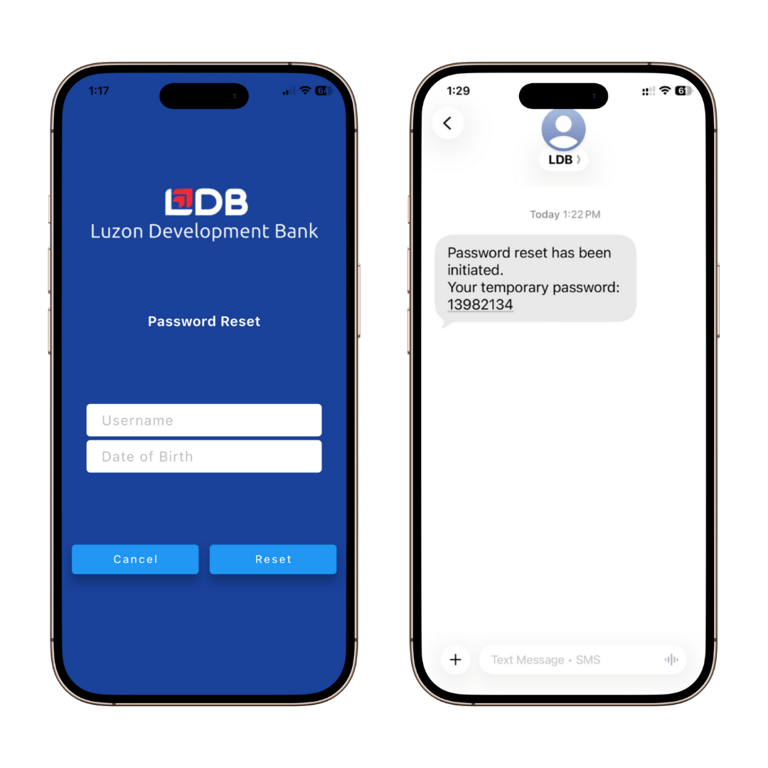
Step 2: Fill out your username and date of birth. You will receive an SMS message from LDB with your temporary password.
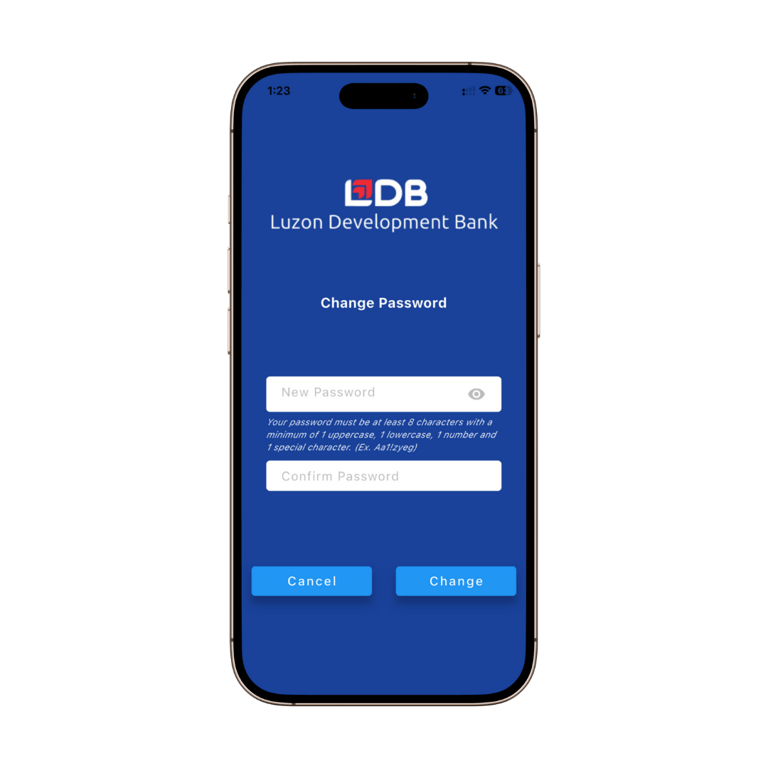
Step 3: Go back to the log-in screen and use the temporary password to sign in. You will then be prompted to enter your new password. Use this new password to log in as usual.
Reminders:
If you get a "Password Lockout" error, it means you have made five wrong password attempts and you can no longer log in for the day. You may try again on the following day.
If you cannot remember your username, go to this guide for instructions.
Got questions?
Copyright 2026 Luzon Development Bank. All rights reserved.
Luzon Development Bank is a supervised bank by the Bangko Sentral ng Pilipinas with telephone number (02) 8811-1277 and email address at consumeraffairs@bsp.gov.ph.